Best Blogger Designs, Tips, Tricks, Tools and Basic to Advanced Training: meta tags

Best Blogger Designs, Tips, Tricks, Tools and Basic to Advanced Training

Best Blogger Designs, Tips, Tricks, Tools, Basic to Advanced Training, Money Making Tips, SEO, Traffic Genaration Methods, Free Templates, Free Hosting Tricks

Hot

Post Top Ad

Your Ad Spot
Showing posts with label meta tags. Show all posts

How To Get Know When Googlebot Last Visit

February 25, 2019 0

How To Get Know When Googlebot Last Visit


Googlebot is the web crawling bot program (spider) used by Google, which discovers new and updated documents from the web to build a searchable index for the Google search engine.
If you want to display when the last time google bot visit to your site , add your site/blog url going to www.gbotvisit.com and click on "Check Google Bot last visit" button.

Now copy and paste the code provided by gbotvisit.com into your blog/website.
If you are using Blogger, add it to "HTML/JavaScript" box. Final result will look like this.
This image is updated every day.
Read More

How to Link Blogger Header to Another Site

February 25, 2019 0

How to Link Blogger Header to Another Site


As you can see in most times, your template header title links to your blogger blog that template has been applied. This tutorial explains how to link your blogger site header to another site you like.
Follow the steps given below to link blogger header to other site.
1.Login to your Blogger account and go to "Edit HTML" of your blog.
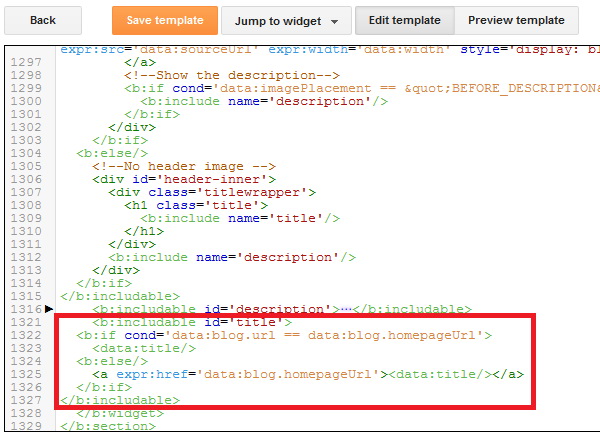
2.Scroll down to where you see this (or use Ctrl+F to find that code):
<b:includable id='title'>
<b:if cond='data:blog.url == data:blog.homepageUrl'>
<data:title/>
<b:else/>
<a expr:href='data:blog.homepageUrl'><data:title/></a>
</b:if>
</b:includable>
Blogger Edit HTML
3.Replace above code with below code:
<b:includable id='title'>
<a href='LINK_OF_YOUR_ANOTHER_SITE'><data:title/></a>
</b:includable>
NOTE : Replace 'LINK_OF_YOUR_ANOTHER_SITE' with actual URL of your another site and save your template.
Read More

How To Add Page Elements to Posts Column and Blog Header

February 24, 2019 0

How To Add Page Elements to Posts Column and Blog Header


For example your Blog Header Page Element widget code looks like this :
<b:widget id='Header1' locked='true' title='MY BLOG (Header)' type='Header'/>
Read More

How To Add Different Meta Tags to Different Blogger Posts

December 30, 2018 0
What's the use of adding different meta descriptions to different Blogger Posts?
It is very good for SEO (Search Engine Optimisation) . Actually, why we are adding meta tags is to tell search engines what that page is all about... but, using same meta tags to all of your blog posts lessens the search engine rankings and traffic little bit.
But, if you add different unique meta tags to different Blog posts, it makes the search engines to know more about your individual blog posts and make them crawl and index your pages better and it also improves your Search engine rankings for sure 😉
So, how to add this?
For this to happen, you have to add some pieces of codes to the template.
First Sign in to Blogger dashboard » Layout » Edit html
and find this line
<b:include data='blog' name='all-head-content'/>
and add this code just below that line
<b:if cond='data:blog.url == "http://www.howtoblogacademy.blogspot.com/"'>

<meta content='DESCRIPTION' name='description'/>
<meta content='KEYWORDS' name='keywords'/>

</b:if>
Now we have added meta tags to the homepage.
Next, you want to add meta description for your blogger post, for example let see how to add meta tags to below post :
http://www.howtoblogacademy.blogspot.com/2009/03/how-to-add-paypal-donate-button-to-your.html
This is the way to add meta tags to above post:
<b:if cond='data:blog.url == "http://www.howtoblogacademy.blogspot.com/2009/03/how-to-add-paypal-donate-button-to-your.html"'>

<meta content='How to add Paypal Button to your Blogger Blog, Adding Donations to your blog' name='description'/>

<meta content='Adding,Paypal,Donate,Button' name='keywords'/>

</b:if>
Now, what you have to do is pasting the above code below the home page meta tags and changing the link,description and keywords.
So, the final code now looks something like:
<b:if cond='data:blog.url == "http://www.howtoblogacademy.blogspot.com/"'>

<meta content='DESCRIPTION' name='description'/>
<meta content='KEYWORDS' name='keywords'/>

</b:if>

<b:if cond='data:blog.url == "http://www.howtoblogacademy.blogspot.com/2009/03/how-to-add-paypal-donate-button-to-your.html"'>

<meta content='How to add Paypal Button to your Blogger Blog, Adding Donations to your blog' name='description'/>

<meta content='Adding,Paypal,Donate,Button' name='keywords'/>

</b:if>
Just like the above procedure, you can add different meta tags to as many blog posts as you can.
Read More

How to Add META TAGS to Blogger(blogspot) blogs

December 29, 2018 0
Adding meta tags you can get get more traffic from search engines like Google,Yahoo,Bing,etc. Especially the meta description is the most important one.
Meta tags are the tags which describes your site and tells the search engines what your site is all about. Adding meta tags is an important factor in SEO. (Search Engine Optimization). Meta tags allows search engines to index your web pages more accurately. In other words,Meta tags communicate with the search engines and tells more information about your site and make it index correctly and accurately.
We must add two main meta tags to the head section of the template.One is the Meta description which describes your site and another one is Meta Keywords which tells about your site keywords(what your site is all about)
Here is how to add meta tags to your blogger(blogspot) blog:
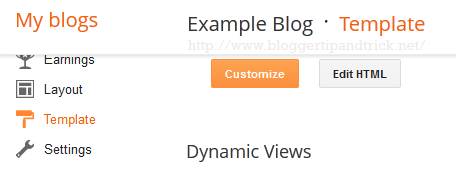
1.Go to "Template" --> "Edit HTML" of your blog.
Template Edit HTML
2.Find this code:
<b:include data='blog' name='all-head-content'/>
3.Now add below code just after the above code.
<meta content='DESCRIPTION HERE' name='description'/>
<meta content='KEYWORDS HERE' name='keywords'/>
<meta content='AUTHOR NAME HERE' name='author'/>
Look at the example below:
Replace,
DESCRIPTION HERE: Write your real blog description
KEYWORDS: Write the keywords of your blog
AUTHOR NAME: Write the author's name(Your name)
Now save your template. You have successfully added meta tags to your blogger blog.
You might also like these:
Complete SEO Guide For Blogger|Blogspot
How To Add Different Meta Tags to Different Blogger Posts
How To Add SEO Friendly Custom Permalinks for Blogger Posts
How To Install Dynamic Meta Description Tags
How To Change Heading Tag For Better SEO in Blogger
How To Add Meta Description to Blogger using Blogger Settings
Read More

Post Top Ad

Your Ad Spot