Best Blogger Designs, Tips, Tricks, Tools and Basic to Advanced Training: seo

Best Blogger Designs, Tips, Tricks, Tools and Basic to Advanced Training

Best Blogger Designs, Tips, Tricks, Tools, Basic to Advanced Training, Money Making Tips, SEO, Traffic Genaration Methods, Free Templates, Free Hosting Tricks

Hot

Post Top Ad

Your Ad Spot
Showing posts with label seo. Show all posts

How To Show Post Title Before Blog Title In Blogger

August 03, 2019 0

How To Show Post Title Before Blog Title In Blogger
You don’t have to do a Herculean task to make your blog title appear first. I am going to walk you through the exact process so that, you will not lose it in the midway.
Go to your blogger dashboard.
Click on Template.
Then, click the Edit HTML button.

Read More

How To Add One Click Sitemaps Submitter to blogger

March 01, 2019 0

 How To Add One Click Sitemaps Submitter to blogger

With this tool your visitors can directly notify Google, Yahoo!, Ask.com and Moreover.com about their new or updated sitemaps file.
1.Login to your dashboard--> layout- ->Page Elements
2.Click on 'Add a Gadget' on the sidebar.
3.Select 'HTML/Javascript' and add the code given below and click save.
Read More

How To Add Indexed Pages Checker to blogger

March 01, 2019 0

 How To Add Indexed Pages Checker to blogger


1.Login to your dashboard--> layout- ->Page Elements
2.Click on 'Add a Gadget' on the sidebar.
3.Select 'HTML/Javascript' and add the code given below and click save.
<form method ='post' action = 'http://www.seocompany.ca/tool/indexed-pages.php'>
<textarea name ='urls' cols=50 rows = 10></textarea><p>
<input type = 'submit' name = 'submit' value ='Check Now!'>
</form>
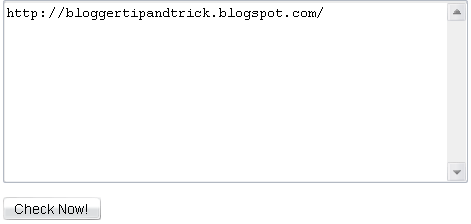
Now you are done.Look at the picture below.
Read More

How To Get Know When Googlebot Last Visit

February 25, 2019 0

How To Get Know When Googlebot Last Visit


Googlebot is the web crawling bot program (spider) used by Google, which discovers new and updated documents from the web to build a searchable index for the Google search engine.
If you want to display when the last time google bot visit to your site , add your site/blog url going to www.gbotvisit.com and click on "Check Google Bot last visit" button.

Now copy and paste the code provided by gbotvisit.com into your blog/website.
If you are using Blogger, add it to "HTML/JavaScript" box. Final result will look like this.
This image is updated every day.
Read More

How To Add Beautiful Subscribe Widget to Blogger

February 25, 2019 0

How To Add Beautiful Subscribe Widget to Blogger


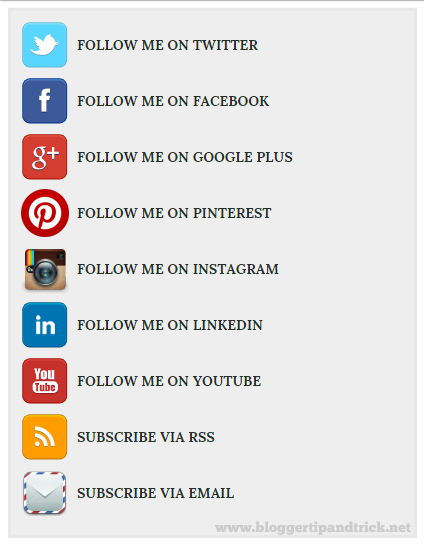
Do you like to add a good looking social subscribe widget to your blog? Then simply follow the steps given below.
1.Login to your blogger account and go to "Edit HTML".
2.Scroll down to where you see </head> tag .
3.Copy below code and paste it just before the </head> tag.
<style type='text/css'>
@import url(https://fonts.googleapis.com/css?family=Lora:400,700);

#subscribe-btt {
margin: 0;
padding: 10px;
background: #eee;
border: 3px solid #e8e8e8;
}

#subscribe-btt:hover {
background: #e9e9e9;
border: 3px solid #ddd;
}

#subscribe-btt h2.mysocialurl {
border: 0;
margin: 0 0 8px 0;
padding: 0 0 0 56px;
height: 48px;
line-height: 48px;
font-size: 14px;
font-style: normal;
font-weight: bold;
font-family: Lora;
}

#subscribe-btt h2.my-twitter {
background: url(https://blogger.googleusercontent.com/img/b/R29vZ2xl/AVvXsEjI5pK-pHEIIgVsC7cMuti2DYX2oZaw2LjkGwlPuOpAkDM1HN9yKKRtr4E1VZHA6cKZZiwPrcyMa47qTfqbYyVa7MPk3ROpWfzmLsTXxfxAm0lCBgoiPlU1CuDi6q4no_wm1-gUl7r-6n3i/s1600/twitter.png) no-repeat top left;
}

#subscribe-btt h2.my-facebook {
background: url(https://blogger.googleusercontent.com/img/b/R29vZ2xl/AVvXsEiztt8SXZePhM4Qu3R-82bCkqEMRFP9phP-2BjIKH-t2fMukGjisp045lfUzOQ1q5xuY85na9TTBxlThz6HcjUxDlF06zsTODuWxIBkLdpogeLXDBSSgroHFVgaVvJSPafoKpXsv7nY9Qrm/s1600/facebook.png) no-repeat top left;
}

#subscribe-btt h2.my-googleplus {
background: url(https://blogger.googleusercontent.com/img/b/R29vZ2xl/AVvXsEhbrXZOZsNspd78iETdGbgBusnsGgLHFUBRE71X4sj2oQcGSzSP-dJwBH-v5SkInxU0ZFnQqk4xH5iIPsCyqc06YQX_ktgk2863Px9VWWv8voslpPVKJbkV-P_yBKR7qQGaROMgyQy3OcJM/s1600/google_plus.png) no-repeat top left;
}

#subscribe-btt h2.my-pinterest {
background: url(https://blogger.googleusercontent.com/img/b/R29vZ2xl/AVvXsEhi05WFxzNNytgz4uJujKdSV1JcZoJeff5cjM_-yNyQb_KDq3xRjBk7vsydBHByC3W6Tzp69tTVNiD4uT7RzDRlCsu9Sfm68yixSkZZO0x73xX2K1iXu3Y2fVixKhimzXLS9tIPg96B8pCd/s1600/pinterest.png) no-repeat top left;
}

#subscribe-btt h2.my-instagram {
background: url(https://blogger.googleusercontent.com/img/b/R29vZ2xl/AVvXsEgDFHV4Rc2Zbiz6ngjeKQyYGkCPmeWyvRVcq2Y0qbSqPj2-sdwpT57MKCPE6oZRGIr6u1guAFBp5eaWOkphPbxzseucg0eOY-bYhZRjFsDwu7yDOUCIa8dJOk7oqEAvrRGsk-54Bd_JI1E4/s1600/instagram.png) no-repeat top left;
}

#subscribe-btt h2.my-linkedin {
background: url(https://blogger.googleusercontent.com/img/b/R29vZ2xl/AVvXsEhKpJ7jeXxQE-OPM_esEfNNAxpwk-pvKAvls2N4PgfkyCZ_n_DU9aZNmaF8gHQjgeIzMJWfWCqEa57eBa9AwjtkRK5ZnFeaQdULunJM_f9_deruTQg1wm9Nr90RWW4MWNecRlzBkbaQmUJq/s1600/linkedin.png) no-repeat top left;
}

#subscribe-btt h2.my-youtube {
background: url(https://blogger.googleusercontent.com/img/b/R29vZ2xl/AVvXsEh7IYC0WNAmfdql8pGDr6Y3irVyv0kpAF73hZTHOaVo_IPL2HcDfdg67lHmC9VPuFetmBHPjNe6IDtRB7G6Hvk6cwQ6U04wcjJzUm-K2wYq3fXxTKqTxYAmB6bR1iMaFsoZyQg7IJ_-3AD6/s1600/youtube.png) no-repeat top left;
}

#subscribe-btt h2.my-rss {
background: url(https://blogger.googleusercontent.com/img/b/R29vZ2xl/AVvXsEiolTEP7sLsh2nfZoVgx97Nt7PFwC3PYYTShP67pdP8_Y4mF74xBt5KVwuR6S5ltBifK-XEzD2COJzPLolZnkjJcs8sWCAEwuFQh1LGrGU0YmYnr9eAVTu_6Zo5U5RenfR9uaHUSY_qOkVw/s1600/rss.png) no-repeat top left;
}

#subscribe-btt h2.my-email {
background: url(https://blogger.googleusercontent.com/img/b/R29vZ2xl/AVvXsEgR-yjD_8zGtGXQXPYaqlxzzbDWWgBY-5cTu0h7VVJd9HOgAuzRonNllEP8HLoQ3YXtgMHBsU4MLuttwnWmgA2PbBg4p0EGwFZ7nGyCV2pKPELhr7yqWOrQRJ58gAxqdGva8iCVgQZGwmn3/s1600/mail.png) no-repeat top left;
}

#subscribe-btt .mysocialurl a {
color: #252e28;
text-decoration: none;
}

#subscribe-btt .mysocialurl a:hover {
color: #000000;
text-decoration: underline;
}
</style>
4.Now go to "Layout" and click on "Add a Gadget".
5.Select "HTML/JavaScript" and add the code given below and click "Save".
<div id="subscribe-btt">

<h2 class="mysocialurl my-twitter"><a href="YOUR-TWITTER-URL">FOLLOW ME ON TWITTER</a></h2>

<h2 class="mysocialurl my-facebook"><a href="YOUR-FACEBOOK-URL">FOLLOW ME ON FACEBOOK</a></h2>

<h2 class="mysocialurl my-googleplus"><a href="YOUR-GOOGLE-PLUS-URL">FOLLOW ME ON GOOGLE PLUS</a></h2>

<h2 class="mysocialurl my-pinterest"><a href="YOUR-PINTEREST-URL">FOLLOW ME ON PINTEREST</a></h2>

<h2 class="mysocialurl my-instagram"><a href="YOUR-INSTAGRAM-URL">FOLLOW ME ON INSTAGRAM</a></h2>

<h2 class="mysocialurl my-linkedin"><a href="YOUR-LINKEDIN-URL">FOLLOW ME ON LINKEDIN</a></h2>

<h2 class="mysocialurl my-youtube"><a href="YOUR-YOUTUBE-URL">FOLLOW ME ON YOUTUBE</a></h2>

<h2 class="mysocialurl my-rss"><a href="YOUR-RSS-FEED-URL">SUBSCRIBE VIA RSS</a></h2>

<h2 class="mysocialurl my-email"><a href="YOUR-FEEDBURNER-EMAIL-SUBSCRIPTION-URL">SUBSCRIBE VIA EMAIL</a></h2>

</div>
NOTE : In above code, replace pink colored codes with your social profile URLs.
Final result will look like this:
Social Subscribe Box to Blogger
Read More

How to Link Blogger Header to Another Site

February 25, 2019 0

How to Link Blogger Header to Another Site


As you can see in most times, your template header title links to your blogger blog that template has been applied. This tutorial explains how to link your blogger site header to another site you like.
Follow the steps given below to link blogger header to other site.
1.Login to your Blogger account and go to "Edit HTML" of your blog.
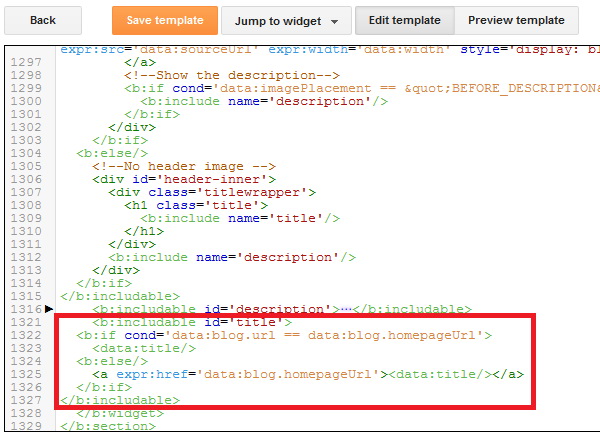
2.Scroll down to where you see this (or use Ctrl+F to find that code):
<b:includable id='title'>
<b:if cond='data:blog.url == data:blog.homepageUrl'>
<data:title/>
<b:else/>
<a expr:href='data:blog.homepageUrl'><data:title/></a>
</b:if>
</b:includable>
Blogger Edit HTML
3.Replace above code with below code:
<b:includable id='title'>
<a href='LINK_OF_YOUR_ANOTHER_SITE'><data:title/></a>
</b:includable>
NOTE : Replace 'LINK_OF_YOUR_ANOTHER_SITE' with actual URL of your another site and save your template.
Read More

How To Embed a Web Page on Another Site

February 25, 2019 0

How To Embed a Web Page on Another Site


1.Login to your dashboard--> layout- ->Page Elements
2.Click on 'Add a Gadget' on the sidebar.
3.Select 'HTML/Javascript' and add the code given below and click save.
<iframe height="400" width="90%" frameBorder="0" src="URL OF WEB PAGE">your browser does not support IFRAMEs</iframe>


Note :
 Remember to replace URL OF WEB PAGE,with the url you want to embed into your site.You can change height,width.
Look at the example below.
<iframe height="400" width="90%" frameBorder="0" src="http://google.com">your browser does not support IFRAMEs</iframe>
Now you are done.
Read More

How To Add Spider View Checker to blogger

February 25, 2019 0

How To Add Spider View Checker to blogger


This gadget will show to your visitors how Spider bots view their websites. This includes most major search bots including Google, MSN and Yahoo!
1.Login to your dashboard--> layout- ->Page Elements
2.Click on 'Add a Gadget' on the sidebar.
3.Select 'HTML/Javascript' and add the code given below and click save.
<script src="http://www.mypagerank.net/services/spiderview/servicespiderview_js.php"></script>
Now you are done.It will look like this.
Read More

How To Open PageList Widget Links in New Window

February 25, 2019 0

How To Open PageList Widget Links in New Window


This quick tutorial explains how to open each link of your Blogger PageList widget in new window or new tab.
1. First Login to your Blogger account and go to "Template"--> "Edit HTML" of your blog.
2. Now find your PageList widget code. (Note : You may also can find it by searching <b:widget id='PageList)
Read More

How To Hide Blogger Blogs from Search Engines

February 25, 2019 0

How To Hide Blogger Blogs from Search Engines


Although displaying in your blog in search engines is important to bring more visitors, we can hide Blogger blogs from search engines and remove our blog from blogger listings very easily through Blogger.com settings. This is useful if you are running a personal blog and do not want to become it "Private" through Blogger settings.
Read More

How To Submit blogger sitemap to yahoo to index your web pages

February 24, 2019 0

How To Submit blogger sitemap to yahoo to index your web pages


Submitting your site to yahoo is easy and give your web pages more exposure.
All you need is a YAHOO ACCOUNT(ID).However,you don't need an yahoo ID to know the information like how many pages are indexed,etc.But,if your blog is a new one or no pages in your blog are indexed(type your blog url in yahoo search and see to check whether your web pages are indexed or not), then you want Yahoo id to submit your sites, feeds, etc.

Read More

How To Redirect Blogger URL To Another URL

February 24, 2019 0

How To Redirect Blogger URL To Another URL


1.Log in to your dashboard--> layout- -> Edit HTML
2.Scroll down to where you see <head> tag.
3.Add below code into your template just after the <head> tag.
<meta http-equiv="refresh" content="0;url=http://yournewurl.com"/>
It should Look Like This.
<head>

<meta http-equiv="refresh" content="0;url=http://yournewurl.com"/>
4.Replace http://yournewurl.com with the URL you want to redirect your old blog.
5.Click on Save Templates and you are done.
Now your blog traffic will be redirected to your new address.
Read More

How to Market Your Blog Content to Sororities

February 24, 2019 0
How to Market Your Blog Content to Sororities
If you’re promoting your business through social media, you know the importance of balancing advertising with quality content. Content marketing is the tool of choice for 86 percent of B2C businesses, according to the Content Marketing Institute, and more than 50 percent of those businesses report that their content marketing is more successful than it was a year ago. The biggest factor in that success is a strong marketing strategy that tailors the content to the target audience.Marketing to sororities is a smart choice on many fronts. Based on reports from the 2017 National Panhellenic Conference (NPC), more than 400,000 current college students are sorority members, with another 350,000 remaining active as alumnae. National sororities have formed more than 3,000 individual chapters at colleges and universities across the country.In her article for Canvas8, anthropologist Andrea Graham Richeson says, “Sorority culture embraces cohesive identities that reflect membership, social status and aspiration. Furthermore, members report feeling empowered by their role as a well-connected individual who can make things happen. Their reputation as popular influencers and their ability to mainstream trends on campus has helped many clothing, make-up and tech brands go from virtual unknowns to status symbols seemingly overnight.”Katie Bulmer, author of Sorority Girls Can Change the World, concurs: “What was once considered nerdy, sloppy, or irrelevant turns into a multi-million-dollar business when sorority girls decide it’s cool.”In order to produce content with that sorority coolness factor, you need to identify what these trendsetting sisters are talking about and join that conversation. SEOpressor.com recommends using the “Get Ideas” feature in Google Keyword Planner to find out what sorority members are already searching for online and then provide content that answers those questions.The 80/20 Rule states that while 20 percent of content can promote your products directly, the other 80 percent should provide information that is interesting, entertaining, and useful to your audience, which often requires additional research.In her article for Chron, Daria Kelly Uhlig recommends businesses “survey sorority members to find out what product characteristics influence their decisions to purchase—or not purchase. Extract information about other products and services they commonly use, activities they participate in, entertainment establishments they frequent and any other information you need to understand sorority members and their lifestyle.”In Bloomberg Businessweek, Kim Bhasin describes how some sororities “share a signature fashion sense, built around a cluster of brands, to whom they are fiercely loyal.” However, Richeson argues that sororities “are not a monolith. Some chapters are more casual than others, and care little about designer goods and uniformity.”Thomas Smith, owner of screen-printing company Graphic Cow, describes in an interview in Upstate Business Journal how the fashion needs of sororities are evolving. In the age of Instagram, sororities didn’t need to order his T-shirts to commemorate a specific charity event when photos of it could be immediately posted online.Instead, they wanted apparel that made them stand out from every other Greek organization on social media. To meet that demand, Smith created Magnolia Designs, a separate division that prints Greek letter brands on everything from flowy conservative blouses to crop tops and bodysuits. “Sororities are looking for the most unique thing. My job is anticipating what the next thing might be.”Bulmer notes that sorority members are passionate and dedicated to cooperation and staying connected, which is why they have “on average, 50 percent more followers on social media than their non-Greek peers.” They will expect a steady stream of content, regular updates, and quick replies to their comments. They are social media-savvy enough to tell the difference between content of genuine value and spam.In addition to posting regularly, it’s important to post pieces that are timely. Get to know the cycle of sorority life from the beginning of fall semester to graduation. During spring recruitment season, for example, you can expand your audience and appeal to potential members by writing articles about pledging to sororities, choosing the right sorority, surviving the stress and excitement of rush week, or finding the perfect sorority dress for the spring formal.Most importantly, create content for real sorority members, not the stereotypical vacuous party girls so often portrayed in film. Richeson points out that Greek women maintain higher GPAs and have higher graduation rates than their non-Greek counterparts. Chapters place great importance on academic excellence, leadership development, and philanthropy. The NPC reports that sororities raised $34,093,349 for charity and volunteered 2,484,069 hours in 2017 alone.While your content can feature hair and makeup tutorials, it should also offer solutions to more pressing issues. For example, sorority members, like all college students, are concerned about managing student debt and finding a job after graduation; you can provide information on grants and scholarships, tips on budgeting, or strategies for resume-writing and job interviews.Sisters are constantly planning events, so include content about fundraising, affiliates they might partner with, or causes in need of their support. An article about hangover cures will likely be a flop, but a well-researched piece on keeping fit while maintaining a busy schedule will be well received.Don’t forget that you can use your content to pose questions and ask for feedback as well. SEOpressor.com suggests offering rewards for followers who post a comment or product review such as a chance to win a giveaway or free shipping on an order.How have you made sororities your target audience? Let us know in the comments about your blogging strategies.

Read More

5 Best Free & Paid Online Backlink Checker Tools

February 24, 2019 0
SEO

5 Best Free & Paid Online Backlink Checker Tools

With regard to SEO, much has changed in the last couple of years, but one thing that remains the same is the backlink.
Formerly, your site would rank higher based on the number of backlinks you’ve gotten, but in 2019 it’s all about how many quality links you have.
Last year, Google’s Penguin algorithm update killed all the private blog networks and devalued the low-quality links. In this tutorial, I will be discussing some of the best online backlink checker websites you can use to check how many backlinks your website has gotten.
More about backlinks:
  • 5 Ways To Get More Back-Links in Less Time
  • 101 Ways to Get Quality Backlinks To Your Blog
Page Contents

Why you need backlink checker tools:

When any website links to your site or any page of your site from its website, this is called backlinks. Backlinks used to be one of the most important parameters for high page ranking and better keyword ranking. However, with time, Google demoted the priority of backlinks and added more signals to rank a website.
Backlinks are usually categorized in two ways: Dofollow backlinks and no follow backlinks.
When we talk about creating backlinks, we usually concentrate on creating dofollow links. Using backlink checker tools, we count how many backlinks we have created for our site. A good number of backlinks helps immensely in improving the page rankand also the Moz rank of our site.
Following are some free online backlink checker tools that will help you to see all the incoming backlinks to your website. You can select any one of these tools based on your requirements. Some of them offer detailed results while others offer only the number of backlinks, but none of them requires registration or sign up that makes the process quick and easy!
  • Update: SEMRUSH added backlink analytic feature.
  • Read: 5 Awesome Websites to Check Google Keyword Ranking

Find backlinks to your site with these backlink checker websites:

SEMRUSH: Most popular with multiple features
SEMRUSH is a tool that I have been using for almost two years, and with the new features they are adding, it is becoming a highly robust SEO tool.
Before I discuss the backlink checking feature of SEMRUSH, I must mention that it is not a free tool, but you can use this special link to try SEMRUSH completely free for 14 days.  If you find it to be a useful tool, its cost to purchase is $199.
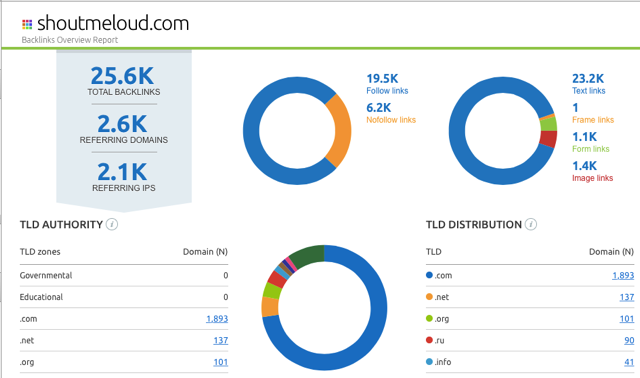
SEMRUSH has an extensive database that is updated daily, allowing you to check accurately your website’s backlink status.  Here is a screenshot of their main page, where I’m checking the backlink status of my blog.
SEMRUSH Backlink overview report
Note how their domain Overview report displays details such as which TLD’s zone is linking you to the most pages.  You can also find details about the country from which you are getting most links.
You can use SEMRUSH to check backlinks for your website or your competitor’s website.
They also have a backlink comparison tool that you can use to compare your own domain’s backlinks with others, and get a complete report. Here is one such report:
backlink comparison
Overall, SEMRUSH is a tool that you should be using right now as your backlink checker.
Here again is the special link that will allow you to try SEMRUSH for free for 14 days. (You can cancel anytime within the 14-day period, and you will not be charged.)
AHrefs: Recommended for link detox
ahrefs link checker
AHrefs is a recent addition that I find to be worthy of mentioning here. It is a paid backlink checker tool, but if you register for a free account, you can get a complete backlink analysis along with an anchor text analysis of your site.
This tool offers a great deal of detailed related to all of the backlinks to your site, and with time you can see how your site links are increasing or decreasing.
Following the Penguin update, if you are hit with negative SEO, this will be a lifesaving tool for your site, as you can get all the link details along with a percentage breakdown of anchor text pointing to your site.
AHrefs is one of the best backlink checker tools on my list.
Check your Backlink using Ahrefs
opensiteexplorer
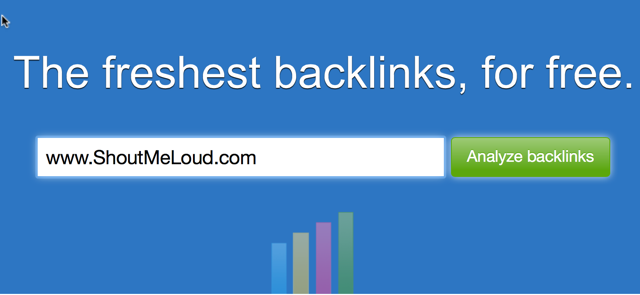
OpenLinkProfiler is one of the latest additions to the list of free backlink checker sites. This is a completely free tool that allows you to check the freshest backlinks (and all other backlinks) pointing to your site. You can also export 1000 of the freshest backlinks in .csv format. This tool is probably the best completely free option available for checking links to your site.
BuzzSumo Backlink Checker
BuzzSumo is one of my favorite tools for content marketing, and they offer a free version as well as a pro version. The pro version now has an added feature allowing you to check backlinks to your domain or any individual page. You also have the option to export existing links into .csv or Excel format.
Check out BuzzSumo.

Of all the tools listed in this article, Open Site Explorer is an old one & quite popular.  If you want to compare backlinks between two or more domains, Open Site Explorer is worth trying. This tool works best when you have a paid account of SEOMOZ though a free version of this tool is good enough to get you started checking the backlinks of your site and the sites of your competitors.

Link ]
Openlinkprofile provides you with different options while checking backlinks for your blog. This free backlink checker tool is brought to you by SEOProfiler.  For example, if you need a detailed report or optimization, or if you want to check backlinks for a single page or an entire website, Link Diagnosis allows you to do all of this.  It also offers various types of outputs and other features.
Link ]
This article has pointed you toward some of the fastest and most trusted backlink checker tools that you can use right now for your blog. I would also suggest that you read the review of SEMRUSH which I shared earlier.
Let me know if you know of any other tools that allow you to check backlinks in the fastest way possible. Remember to share this post with others on Google+  and Twitter!
Read More

OpenLinkProfiler : Free Backlink Tool To Check Unlimited Backlinks

February 24, 2019 1
SEO

OpenLinkProfiler : Free Backlink Tool To Check Unlimited Backlinks


OpenLinkProfiler Free Backlink Tool
Few days back I talked about Domain authority which is the best way to measure the success of a domain or a webpage. If you read that article, you must be aware of the fact that: backlink is still one of the biggest criteria for higher ranking of a webpage.  Today, I’m talking about one of the finest free tool to check backlink which let you find the freshest links to your site.
  • Must read: 101 affordable ways to get quality backlinks to your blog
As a free option, this is a great solution to check backlinks for your domain or any domain you want. The free tool which I’m talking about today is OpenLinkProfiler. This is a great looking tool to check links to any domain (Including yours) and you can do much more than just checking links.

Features of OpenLinkProfiler:

What I liked the most about this tool is, it let you check backlinks for unlimited domain and you can also download newest 1000 links to any domain in .csv format. Here is a screenshot of this tool for ShoutMeLoud domain:
find links to a website

This tool offers great feature for backlink builders to identify good domains to get links from. The idea is to analyse your competitor site and filter the result based on “Only links based on trusted top level domains“. It will show the results from top domain and also the LIS score. LIS is the link influence score of any page, and it’s calculated on a scale of 0-100%. (I don’t have enough information such as how LIS score is calculated at this moment). Here is the screenshot of the filter page and see the results this tool showed:
OpenLinkProfiler
You can further click on any link in link destination column to find more links to the site. OpenLinkProfiler also distinguish domains into industry. You can find detailed information about industry categorisation on their FAQ page. Here are few notable features which you should know about OpenLink Profiler:
Link Disinfection:
Link Disinfection tools shows all the low quality and bad links pointing to your site. All the links shown in this tab might not be bad always, so you should carefully audit all the links. You can further use Google disavow link tool to ignore this links.
Pages- Find domain pages with maximum links:
This tab let you find all the pages of any domain with maximum number of links. This is a good strategy to find out top linked pages of any domain. If majority of links are high-quality, that page might be the most valuable page of the domain.
Linkage:
Backlinks by year
This section shows the link pointing to any domain by age. This is a good way to find out if links are built on an aged domain in a short period or it was built over the time.
There are many more features which you will love in this free online backlink tool. Such as:
  • Countries : This section let you see which countries link to any domain.
  • LIS distribution: Here you can see how many high LIS or low LIS domain linking to a domain. It’s normal that you might notice a huge number of low LIS domain linking to your site, but what you should focus on is the site with high LIS score linking to you.
  • LinkAlerts: Send you email notification for newly discovered links.
Overall as a free tool, OpenLinkProfiler is a great backlink analysis tool for any SEO guy or a blogger like you and me. Go ahead and try this site, I’m sure you will find it useful.
Don’t forget to share about this awesome free backlink tool with others on Facebook and Google plus. If you know about more similar tool, let me know via comments.
Read More

Post Top Ad

Your Ad Spot